Record in-person meetings and get a summary
Meetings don't only happen on Zoom. They happen in the hallway, in a café, at the doctor's, or on a walk when a good idea comes up. With the Mesakem app, you tap Record, put your phone on the table and keep talking. Afterward, you get a full transcript and a summary with decisions, tasks and who owns each one.
Free to download. Sign in with your Mesakem account.
What does the Mesakem app do?
Mesakem is an app for iPhone and Android that records meetings that happen in person. Recording keeps going when the screen is locked, and when you switch to another app. When you finish, the recording uploads to Mesakem, and you get a full transcript split by speaker and a clear summary. The meeting is saved in your account, and it shows up in your dashboard too.
Where the app helps
Not every meeting needs a conference room and an open laptop. Here are a few moments when the phone in your pocket is enough.
In the hallway
A quick chat by the elevator, and suddenly something important gets settled. Take out your phone, tap Record, and the details don't get lost.
At a café
A meeting with a client, a partner or a supplier, with no laptop on the table. Your phone records, and you look at the person across from you.
When a good idea comes up
An idea on a walk, or right after a meeting. Record it, talk freely, and get it back written down and organized.
At the doctor's
An explanation about a test, a treatment or a medication. Record with the doctor's consent, then read it again calmly at home. The summary helps you remember. It does not replace your doctor.
In a one-on-one
A talk with your manager, a team member, a mentor or a client. Instead of writing while they talk, you listen. At the end, you have a clear list of what was agreed and what comes next.
Four steps, from your pocket to a summary
No setup and no equipment. Just the phone you already have.
Download and sign in
Get Mesakem from the App Store or Google Play, and sign in with your account: Google, Microsoft or email.
Tap Record
Put your phone on the table. Recording keeps going with the screen locked. Need a break? Tap Pause, and resume when you're ready.
Watch the transcript and jot notes
While the app is open on screen, you see a live transcript. You can jot a few notes in the Notepad, and the summary is built around them.
Get the summary
Finish, and the recording uploads. Usually within a few minutes, you get a full transcript split by speaker, and a summary with decisions, tasks and owners.
Everything you need after the meeting, in your hand
These are the app's own screens, with a sample meeting.
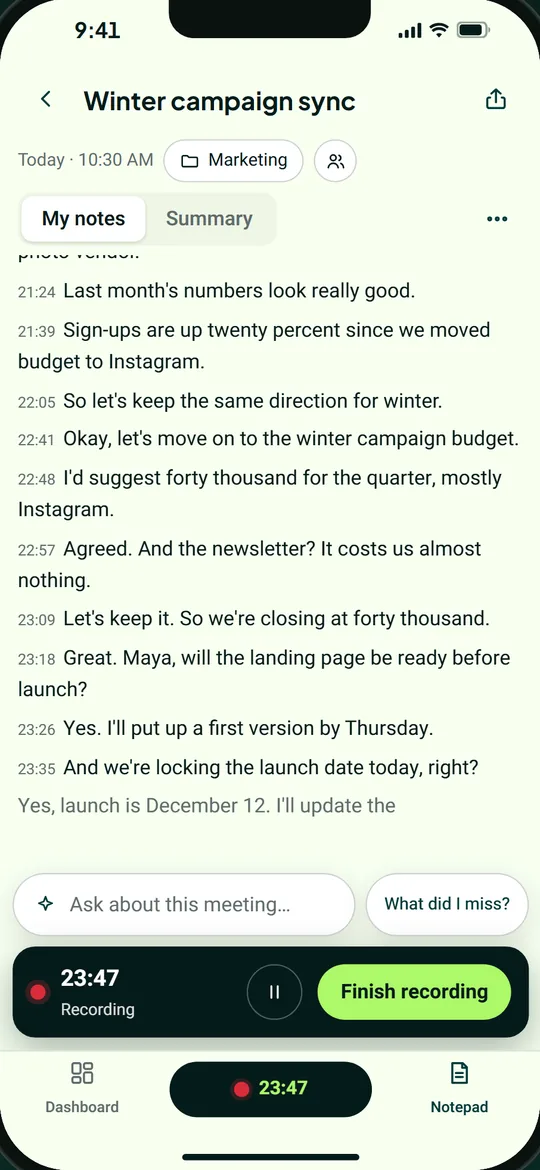
A live transcript, during the meeting
While the app is open, you can see what's being said. Missed something? Tap “What did I miss?”
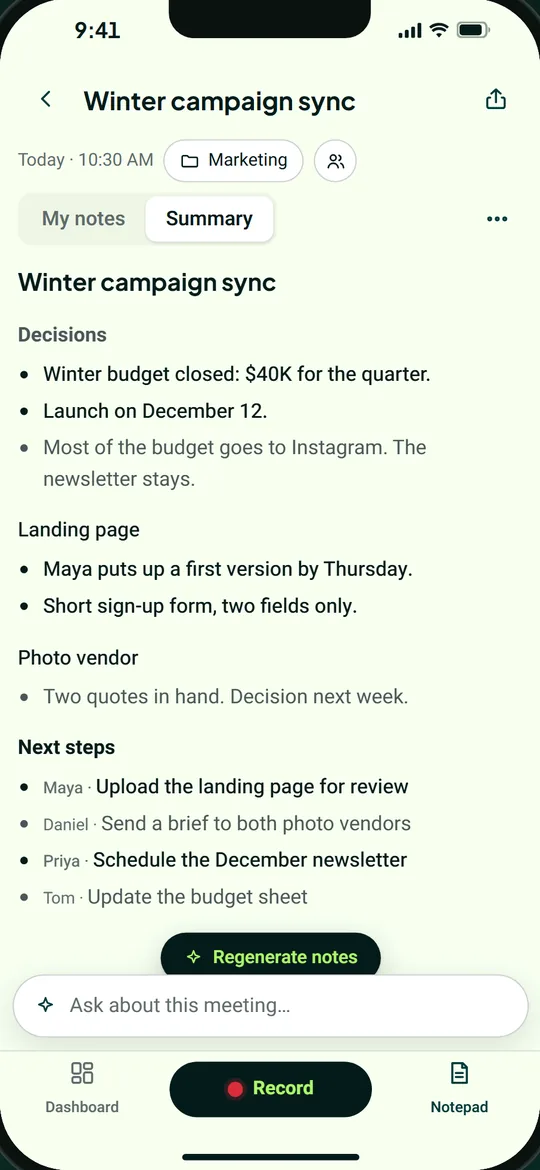
Decisions, tasks and owners
When the meeting ends, you get a clear summary: what was decided, and what each person needs to do next.
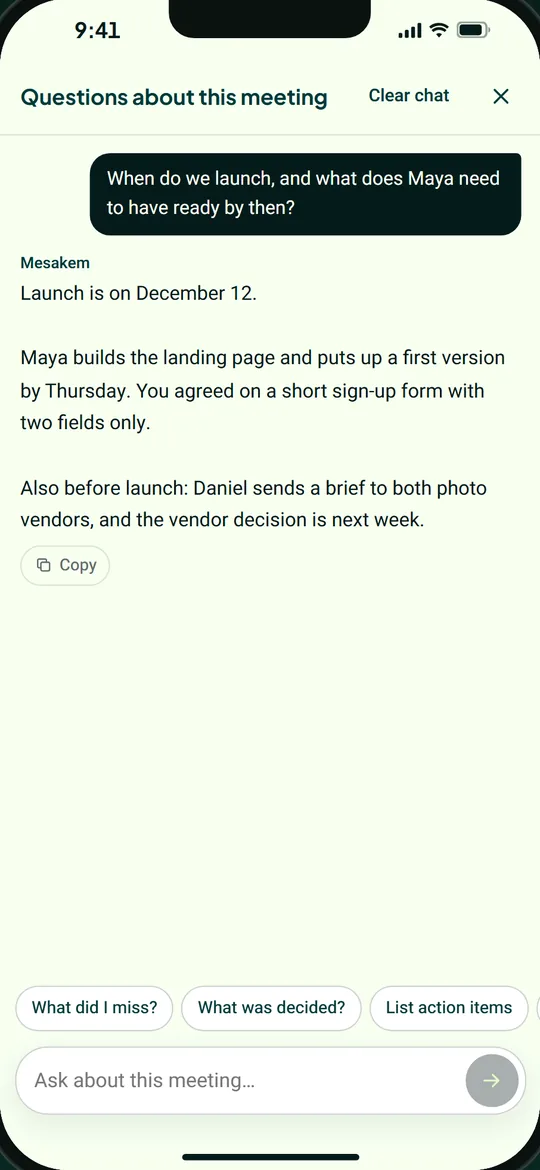
Ask about the meeting
“What was decided?”, “Draft a follow-up email”, or any other question. The answer comes from what was said.
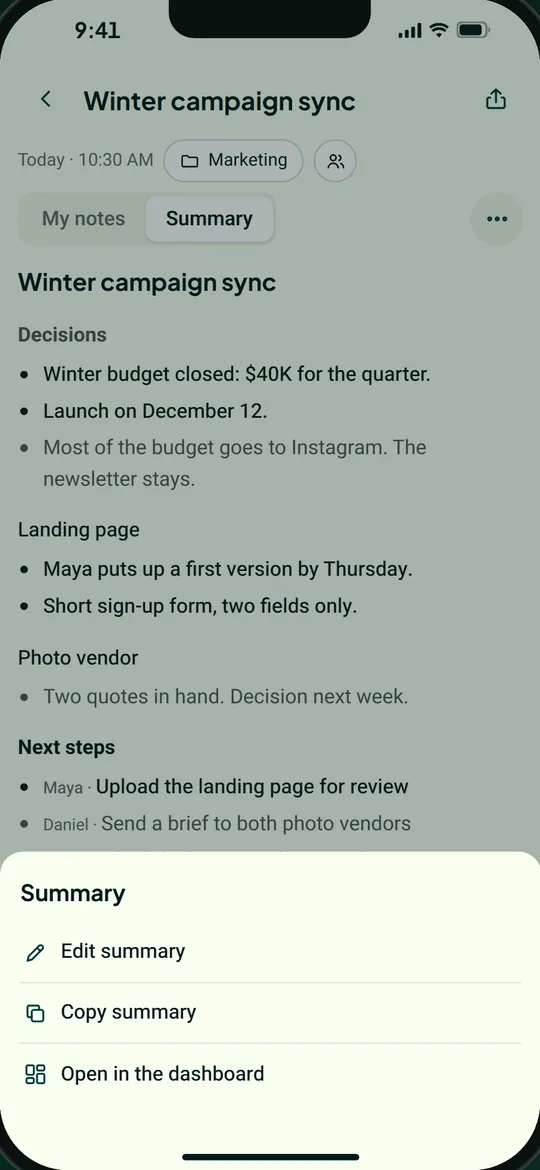
Edit, copy and share
Fix the summary, copy it with one tap, or send a link to whoever needs it.
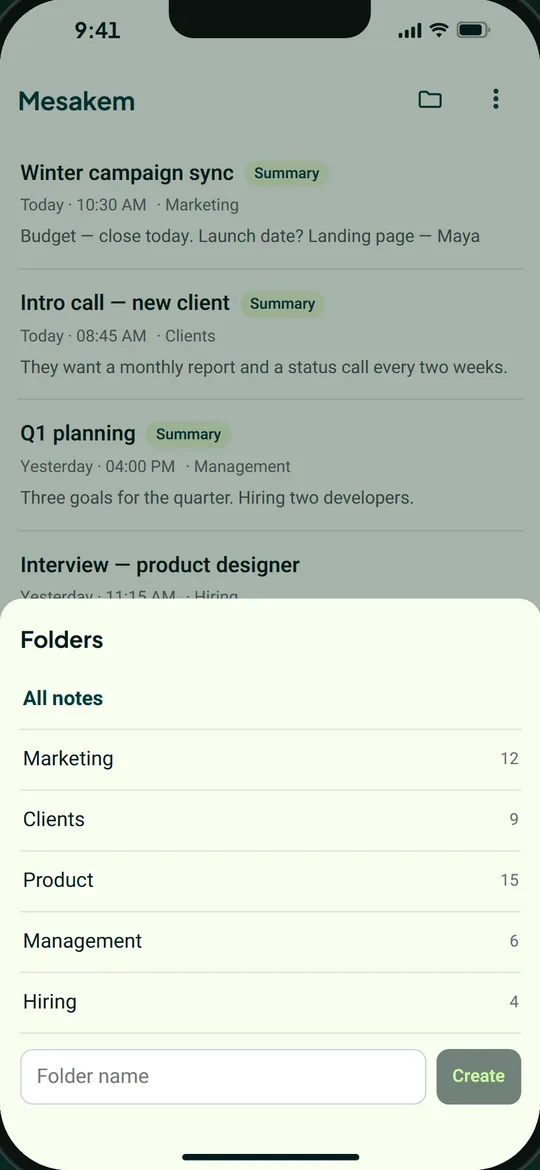
Every meeting, in folders
File each meeting in a folder. Folders are the rooms in your dashboard, so the order carries over to your computer too.
Your recording doesn't get lost
In a real meeting, the phone locks, a call comes in, the signal drops. The app is built for exactly that.
- Recording keeps going with the screen locked, and when you switch to another app.
- A call takes the microphone? Recording pauses, and resumes by itself when it can.
- No internet? The recording is saved on your phone, and uploads when you're back online.
- Once the recording has fully uploaded, the file is deleted from your phone.
- The full transcript is made from the whole recording, including the time the screen was off.
On your phone, your computer and the dashboard
A meeting recorded on your phone is saved like any meeting in Mesakem: with the transcript, the summary and the tasks, in your dashboard too. The Dashboard tab in the app shows all your meetings, summaries and tasks. For meetings on Zoom, Teams or Google Meet, there's the Mesakem bot, or the desktop app.
The bot for online meetingsThe desktop app (Windows and Mac)Everything Mesakem does
Record openly
When you record on your phone, no participant is added to the conversation, so the people with you don't see Mesakem. Tell them you're recording, and ask for consent where the law requires it. A short sentence at the start of the meeting makes it easy. The recording and transcript are sent to transcription and AI service providers to create the summary, as the privacy policy explains.
Download and get started
The app is free to download, for iPhone and Android. Sign in with your Mesakem account, or create a free one.
There's also a desktop app for Windows and Mac · See what each plan includes
Questions about the Mesakem app
Does the Mesakem app work on iPhone and Android?
Yes. Download it from the App Store for iPhone or from Google Play for Android, and sign in with the same Mesakem account: Google, Microsoft or email.
Does recording continue when the screen is locked?
Yes. Recording keeps going with the screen locked and when you switch to another app, until you tap Finish recording. You can also pause and resume.
What happens if the internet drops in the middle?
The recording doesn't get lost. It's saved on your phone and uploads when the connection is back. Once it has fully uploaded, the file is deleted from your phone.
When do I see a transcript, and when does the summary arrive?
While you record, with the app open on screen, you see a live transcript. After you finish, usually within a few minutes, you get a full transcript from the whole recording, split by speaker, and a summary.
Can I record a cellular phone call?
No. A call that comes in takes the microphone, and recording pauses until it can continue. For phone calls, Mesakem has a separate option: summaries of recorded calls through supported call-recording providers. It is currently available in Israel.
Do I need to tell people I'm recording?
Yes, that's your responsibility. On your phone, no participant is added to the conversation, so tell the people with you that you're recording, and get consent where the law requires it. The details are on the Recording and consent page.
What languages are the app and the summary in?
English and Hebrew. You can switch the app's language from the menu.
How much does it cost?
The download is free. A recording from your phone counts as a meeting, like any meeting in Mesakem. Your first 10 meetings are free, up to 90 minutes each, no credit card. To see what each plan includes, visit the pricing page.